
PARKMEMOIR · ROAD TRIP GEAR
Can You Put a Dash Cam in a Rental Car?
Sometimes—but do not assume a rental company or a state automatically allows your setup. Check the rental agreement, mounting position and recording settings before pickup. A rental-only camera should be easy to install, power and remove.
Start with permission, not the product. Ask the pickup location whether a removable mount and plug-in camera are allowed. Then check the windshield and recording rules for every state on your route. If permission or placement is unclear, leave the camera packed away.
1. Ask the rental location before pickup
Rental terms and vehicle equipment can differ by brand, location and vehicle. The public documents below do not establish a blanket nationwide permission for customers to install their own dash cams:
- Hertz U.S. Terms and Conditions discuss dash cams that may already be installed in some electric vehicles. That is not permission to install your own device.
- Avis U.S. rental policy FAQ says applicable terms vary by location and recommends checking the reservation terms and contacting the location.
- Enterprise Terms of Use explains that the rental contract is entered separately with the rental location. Ask that location about your proposed equipment.
Ask the branch these questions and keep the reply with your reservation:
- Is a removable suction-cup windshield mount allowed in this vehicle?
- May I use the vehicle’s 12V outlet or USB power port for a plug-in camera?
- Are there restrictions on audio, cabin recording or parking mode?
- Must the device be removed before return, and are there any restrictions on cable routing?
2. Choose a removable setup
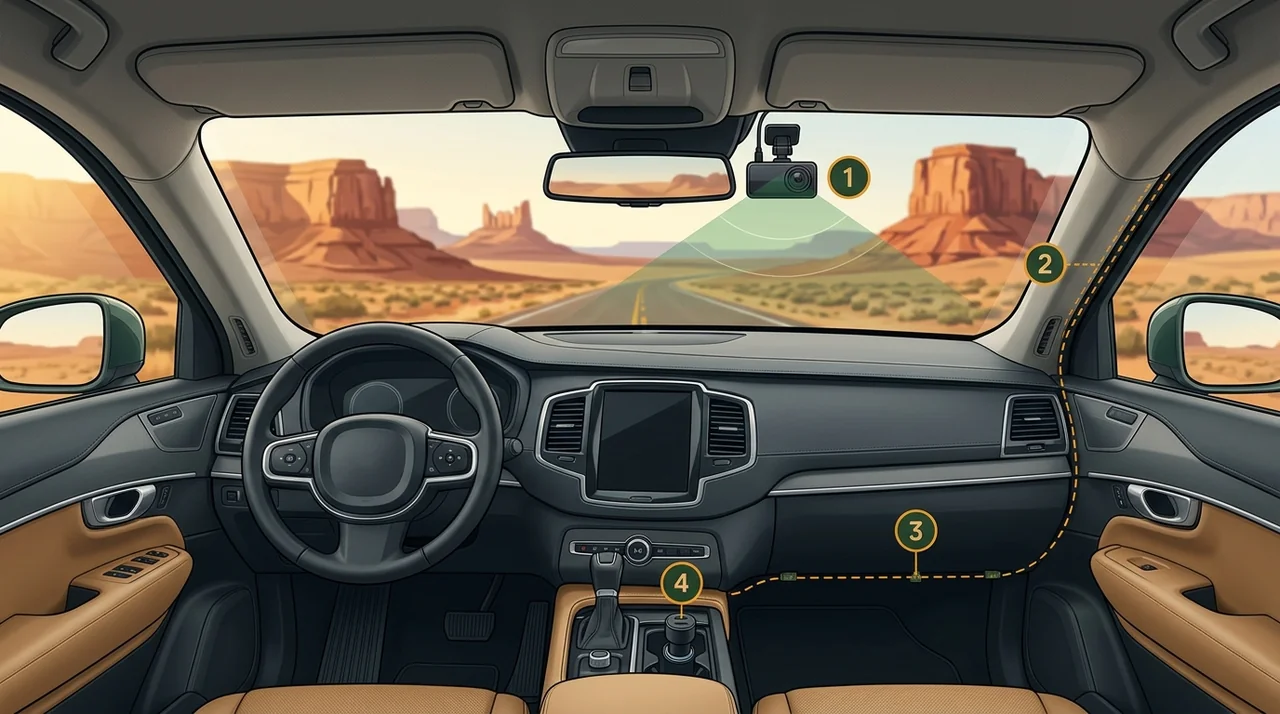
- 1Camera position: Check your rental agreement and local law; no single windshield position is lawful for every vehicle or state.
- 2Airbag clearance: Do not tuck cables behind A-pillar trim, seals, or any airbag deployment zone. If safe removable routing is not possible, do not install.
- 3Loose-cable check: Keep the cable away from steering, pedals, passenger footwells and moving parts. No trim removal.
- 4Plug-in power: Use a device-compatible 12V/USB adapter only with the rental company’s permission; avoid hardwiring.
For a temporary rental, prioritize a simple front-facing camera, a compatible removable mount and a plug-in power adapter. Avoid hardwiring, fuse taps, permanent adhesive or trim removal unless the rental company has expressly approved the work.
- Mount: Use only a mount that fits the exact camera. A suction mount may be easier to remove, but it still needs permission and must not obstruct the driver’s view.
- Power: Use the manufacturer-approved plug-in adapter. Do not assume the outlet turns off with the ignition.
- Cable: Keep the cord clear of pedals, steering, controls and airbag deployment areas. If you cannot route it securely without tucking it behind trim, skip the installation.
- Parking mode: Leave it off for a temporary rental setup and unplug the camera when parked.
3. Audio, cabin recording and privacy
For a rental-only setup, the lowest-complexity choice is usually to disable the microphone and any cabin-facing camera unless you have a clear need and have checked the rules and consent requirements. A three-channel camera can record occupants as well as the road; do not treat the cabin channel as a harmless default.
Recording laws are not identical across states. The examples below are official statutory sources, not a complete 50-state survey or legal advice.
| State | Official source | Practical implication |
|---|---|---|
| California | Vehicle Code §26708 | Includes a narrow exception for defined video event recorders with specified placement areas and passenger-notice requirements. Do not assume every dash cam qualifies. |
| California | Penal Code §632 | Addresses recording confidential communications without the consent of all parties. Consider disabling audio and cabin recording unless you have checked the facts and applicable law. |
| Washington | RCW 46.37.410 | Prohibits windshield or window material that obstructs the driver’s clear view. Do not place a camera where it interferes with visibility. |
| Washington | RCW 9.73.030 | Generally requires consent of all participants to record a private conversation, subject to statutory exceptions. |
| New York | Vehicle and Traffic Law §375(30) | Prohibits objects placed in or on a vehicle in a way that obstructs or interferes with the operator’s view. |
| New York | Penal Law §250.00 · §250.05 | Defines mechanical overhearing of a conversation by reference to consent of at least one party. Other privacy rules may still apply. |
Not legal advice. Laws can change and their application depends on the device, location, recording mode and facts. Check the current official law in every state you will drive through. If uncertain, turn audio and cabin recording off and do not install the camera until you have confirmed the rules.
4. Which camera setup fits your trip?
A front-only camera is usually the simpler rental-only option. A three-channel kit adds cabin and rear coverage, more cables and more privacy decisions. It is better suited to someone who also wants those features in a personally owned vehicle.
Choose by use case
Affiliate disclosure: The Vantrue N4 Pro S link below is a PartnerBoost affiliate link. PARKMEMOIR may earn a commission if you buy through it, at no additional cost to you. The rental-only checklist is editorial; no specific front-only model is endorsed here.
5. Before you drive
- Install only while parked and only after the rental branch has approved the setup.
- Check the camera does not obstruct your view, vehicle sensors or controls.
- Secure the power cable away from pedals and airbag deployment areas.
- Turn off microphone, cabin recording and parking mode unless you have a clear, lawful reason to use them.
- Record a short test clip while parked and confirm the camera is stable.
Rental car return checklist
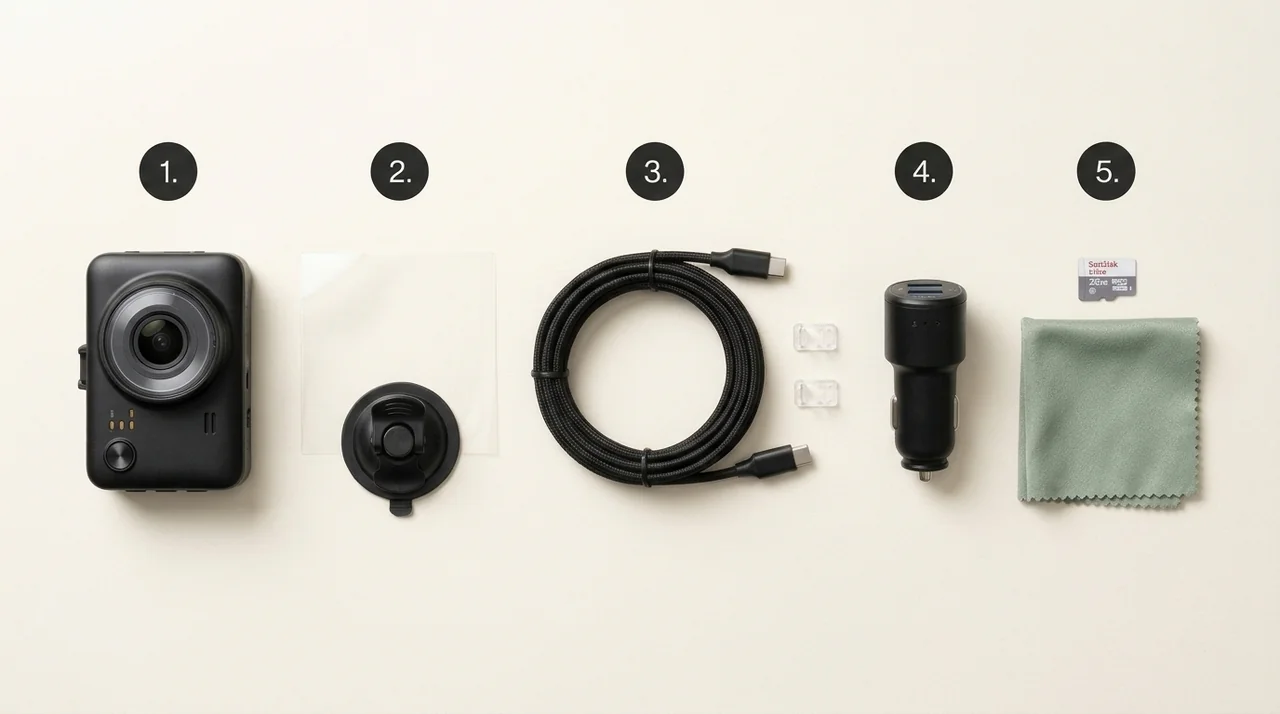
- 1Portable dash cam: Use a camera and mount approved for the particular rental vehicle.
- 2Compatible removable mount: Check that the mount is approved; never promise residue-free removal.
- 3Power cable: Choose the correct length and connector for the camera and vehicle; never route through airbags.
- 412V adapter: Confirm voltage, fit and ignition-off behavior.
- 5Storage and cleaning: Bring a compatible memory card and clean removable accessories.
Use this before handing back the keys. Check each item, then print this small list if useful.
0 of 7 complete
Frequently asked questions
Do Hertz, Enterprise or Avis allow dash cams in rental cars?
Do not assume a blanket policy permits customer-installed cameras. The signed rental agreement and pickup location govern. Ask the branch about your exact mount, power connection and recording settings before installing anything.
Is a suction mount always allowed?
No. A suction mount may be easier to remove, but it can still be prohibited by the rental agreement or placed where it obstructs the driver’s view. Confirm permission and local rules first.
Will a dash cam drain the rental car battery when parked?
Some vehicle outlets remain powered after the ignition is off. Leave parking mode off and unplug the camera when you leave the car unless the rental company has approved another setup.
Should I use a three-channel dash cam for a rental-only trip?
Usually not as the default. A front-only setup is simpler to move between cars. A three-channel kit adds cabin and rear recording, extra cable routing and more privacy considerations.